Fleet Track
Run your whole fleet from one system
Fleet Track is a fleet and transport management system for trucking and logistics companies — covering every journey from booking and dispatch to live trip tracking, billing and reporting, so dispatch, gate, finance and maintenance teams all work from the same data.
- Booking & dispatch
- Trip tracking
- Fleet control board
- Contracts & pricing
- Billing
- Maintenance
- Weighbridge
- Reports
- Role-based access
Where transport operations lose time and money
Dispatch run from spreadsheets
Bookings, schedules and billing spread across files that only one person can safely edit at a time.
One truck, two jobs
Without checks, two dispatchers can book the same truck, trailer or driver for overlapping journeys.
Trips finished, invoices forgotten
When billing is separate from operations, completed trips go unbilled and cash comes in late.
Defects that don’t stop dispatch
If maintenance and dispatch don’t talk, a vehicle with a critical defect can still be sent on a job.
Every journey, from booking to invoice
Fleet Track follows each journey from planning and dispatch through the trip itself to billing — with business rules checked on the server, so the same truck, trailer or driver can’t be booked twice.
Every action is recorded in a full audit trail, and each team sees only what its role allows.
- Booking & dispatch
- Trip lifecycle
- Operations control
- Contracts & pricing
- Billing & statements
- Fleet maintenance
- Weighbridge
- Reports & dashboards
See Fleet Track in action
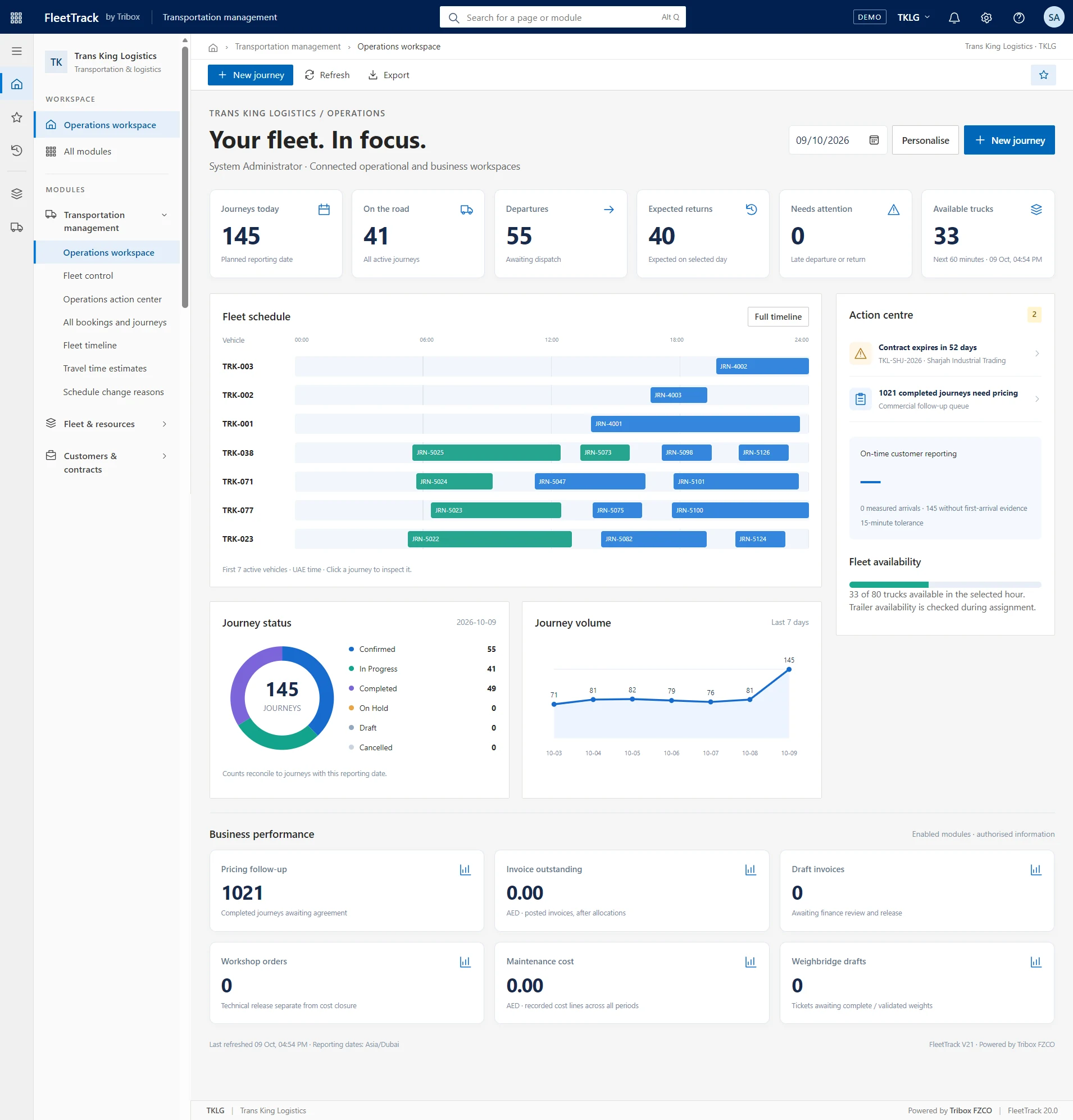
Real screens from the system: the operations workspace, fleet control, the dispatcher's action centre and security roles.
Fleet Track features
Everything a transport operator needs, from the first booking to the final invoice.
Booking & dispatch
Plan journeys with automatic arrival times and catch conflicts before they happen.
- Automatic ETAs and reporting times
- Conflict checks for trucks, trailers and drivers
- Next-availability finder for free slots
- Rules checked again on the server
Trip lifecycle
Follow every trip from start to close-out.
- Start, leg updates and stop arrivals
- Rescheduling with reason codes
- Extra stops and trip documents
- Real travel times improve future ETAs
Operations control
See the whole fleet at a glance and act before journeys run late.
- Fleet control board and timeline
- Action centre with outgoing and incoming queues
- Risk cards for journeys likely to run late
- Click through to the underlying records
Contracts, pricing & billing
Approved rates turn into invoices automatically when trips are completed.
- Draft → Submitted → Approved contracts with amendments
- Rate cards per customer and lane
- Invoice drafts created on trip completion
- Receipts, credit notes and customer statements
Fleet maintenance
Keep vehicles safe and on schedule, with costs under control.
- Job orders with tiered approval limits
- Service plans by days, km or engine hours
- Defect tracking
- Critical defects block a vehicle from dispatch
Weighbridge & reporting
Weight tickets for every stop, and reports for every team.
- Gross, tare and net weight tickets
- KPI dashboard and on-time performance
- Utilisation and profitability reports
- CSV export and branded A4 printouts
How a rollout runs
Discover
We review your fleet, lanes, customers and how dispatch and billing work today.
Configure
Fleet Track is set up with your branding, modules, roles, rate cards and fleet data.
Train
Dispatchers, gatekeepers, finance and maintenance teams are trained on their roles.
Go live & support
A supported go-live, then ongoing support and improvements.
Built on modern web technology
- React
- Node.js
- MongoDB
- Secure role-based access
Built for transport and logistics
Trucking companies
Fleets of trucks and trailers running scheduled and on-demand journeys.
Logistics & distribution
Multi-stop deliveries with customer-specific rates and billing.
Bulk & weighbridge operations
Loads weighed at the gate, with gross, tare and net tickets.
Construction haulage
Materials moved between sites, quarries and plants.
Two ways to work with us
Fleet Track rollout
Setup for your fleet and customers, data migration, training and go-live.
Support & improvement
Help for your teams, updates and new features as your operation grows.
What is Fleet Track?
A management system for transport operators that covers booking and dispatch, live trip tracking, contracts and pricing, billing, fleet maintenance, weighbridge and reporting in one system.
Who uses it?
Dispatchers, gatekeepers, finance, maintenance and management, each with their own role. There are eight roles, from Administrator to a read-only Viewer, and permissions are enforced on the server.
How does it prevent double-booking?
Journeys are checked for conflicts with trucks, trailers and drivers, first in the browser and again on the server. Bookings are saved one at a time, so two dispatchers saving at the same moment can’t book the same truck.
Can we turn modules on or off?
Yes. Modules can be switched on or off, and the system carries your company branding on screens and printouts.
Is our data safe?
Passwords are encrypted, sessions can be revoked, repeated failed sign-ins are locked out, uploaded files are checked, and every action is recorded in an audit trail. Full backups can be exported and restored.
Can we see a demo?
Yes — book a demo using the form below and we’ll walk you through it.